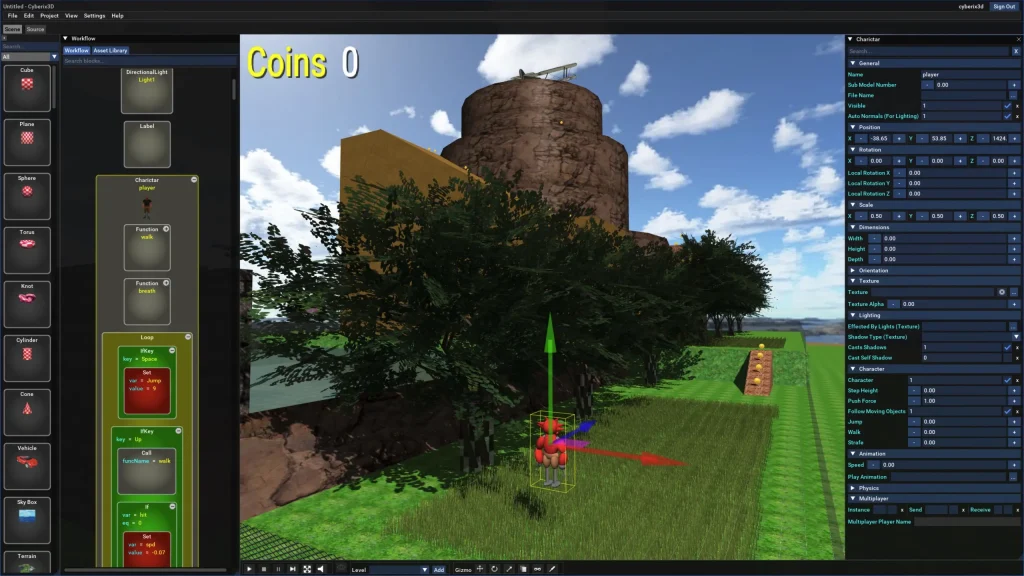
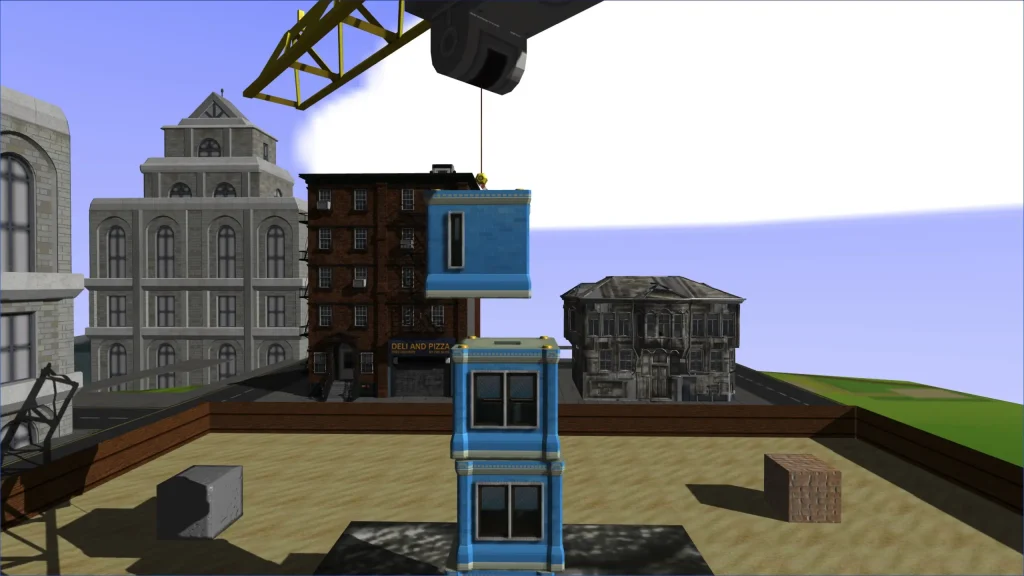
We asked the team behind the game if they could share some insights into the Ogre3D usage and how the game was built in general:
What is Cyberix3D
Cyberix3D is an online 3D game maker for people who have never written a line of code. You build a game out of visual blocks, press play, and it runs. The whole editor is in the browser, projects live in your account, and there is a Windows build if you prefer a desktop app. Finished games can be published on the site and played by anyone, or exported to Windows, Android and the web as standalone builds.
Under the blocks, a game is an XML document. The editor writes it, and it is compiled to Lua that drives the engine. The same path runs in the editor, in the player, and in every export.
The rewrite
The project is not new. The original engine was ActionScript 3 on top of Away3D, from the browser plugin era, and people published games with it for years. When that road ended we rewrote the engine and the editor from scratch in C++ and picked Ogre to render it.
A game built in the old editor
The constraint that shaped everything was that none of the existing games could break. They were made by users, most of them a long time ago, and there is nobody to ask to re-save anything. Because a game is stored as XML rather than as code, the content itself was never tied to the renderer. What had to be rebuilt was the meaning behind it: the new engine has to interpret those blocks the way the old one did. The quirks were the long part. Old games depend on old behavior, so every game carries a version and keeps the behavior it was built against.
Ogre
We are on Ogre 14.3.1, with the components that ship with it: Terrain, Overlay, RTShaderSystem, Paging, Bites, the Octree and PCZ scene managers, ParticleFX, and the Assimp and STBI codecs. Physics and collision go through Ogre’s own Bullet component, and the Lua runtime is bound to the engine with sol2, so a block the user dragged ends up calling straight into Ogre. Dear ImGui 1.91.2 handles all 2D. Not only the editor interface, but the 2D layer of the games themselves: buttons, labels, images, HUDs and menus.
New game utilising ParticleFX
A few things exist only in the new version. Shaders and particle systems can be built dynamically from the code blocks, and there are volumetric lights and true water reflections. We built those on the foundation Ogre provides, some of it starting from the samples.
In the browser
The web build is Emscripten. The same C++ codebase compiled to WebAssembly, rendering through the GLES2 RenderSystem on WebGL2. There is no separate web engine and no reduced web version: the editor itself runs in the browser, not just the games.
Two things needed real attention. There is no blocking main loop on the web, so anything that used to wait had to become a frame driven state. And shaders are GLSL ES only, so the desktop dialects do not carry over; Ogre’s OgreUnifiedShader.h is what makes one shader source compile for both.
Why Ogre
Ogre is genuinely multiplatform, and the web is a real target rather than an afterthought, which for us was the whole point: the editor and the games both have to run in a browser. Bullet and Dear ImGui come integrated, which gave us exactly the physics and the 2D we needed and nothing we had to glue together ourselves. It is fast across a wide range of hardware, down to basic phones and low end machines, which matters when your users play on whatever computer they already have. And it is documented, it has a forum where people actually answer, and it is still being actively developed.
That last one is not a small thing. We started out on Urho3D and it was discontinued while we were building on it, so an engine that is still alive counts for as much as any feature on the list.
Thank you to the Ogre team, and to everyone on the forums. A lot of what made this rewrite possible was already sitting in the box, and a lot of the rest we found in old threads.
Ogre 14.5.0 was just released. This release contains some significant bug-fixes and feature additions, which we will discuss in more detail below. We recommend all users of the 14.x branch to update.
The “Linear Workflow” as described in GPU Gems 3 is now fully supported, finally resolving the “washed-out” look previously associated with “sRGB Gamma Conversion” Option. The RTShader System’s new setTargetLinearColours feature automatically generates shaders that convert color values to linear space before lighting calculations, ensuring physically plausible results for both PBR and classic Phong shading. Additionally, the new setUseLinearColours option in GpuProgramParams enables efficient CPU-side gamma correction for custom shaders. These updates allow you to adopt a mathematically correct lighting pipeline using your existing gamma-space materials without manual modification.
Unified Relaxed Shader Precision
Ogre is unifying shader behavior across platforms by defaulting to relaxed precision (16-bit) in fragment shaders. This update aligns desktop rendering with mobile standards (GLSL ES), unlocking performance gains on Vulkan and D3D11. By defaulting to mediump we are ensuring consistent behavior and making it easier to catch precision-related bugs on desktop hardware. This feature is enabled in the RTSS and available now on Vulkan and GLES, with D3D11 support guarded via the USE_OGRE_FROM_FUTURE macro. This paves the way for Ogre 15, where relaxed precision will become the unconditional standard.
Smarter MSAA Memory Use & Mobile Gains on OpenGL
RenderTexture MSAA across our GL RenderSystems got a significant enhancement, focusing on memory efficiency and cross-platform performance. By adopting a robust pooling strategy similar to our existing depth buffer system, we’ve optimized MSAA RenderBuffer sharing to minimize GPU memory waste while eliminating artifacts in complex “ping-pong” rendering scenarios. This release also brings MSAA support to Multi Render Targets (MRTs) in GL3Plus and GLES3 – a major win for deferred shading G-buffer passes – alongside the introduction of TEX_TYPE_2D_MULTISAMPLE to allow for custom, shader-based resolving. Finally, mobile and tile-based GPU performance sees a boost through the implementation of glInvalidateFramebuffer, which eliminates costly memory write-backs to ensure your applications run more efficiently than ever.
Ogre 14.4.0 was just released. This release contains some significant bug-fixes and feature additions, which we will discuss in more detail below. We recommend all users of the 14.x branch to update.
This release introduces major upgrades to our layered rendering capabilities. You can now efficiently render to multi-layer targets like cubemaps and texture arrays. The key feature, per-rendertarget instancing (VPRT support), enables rendering to all layers of a texture in a single pass. This dramatically reduces draw calls – by up to 6x for cubemapping and 3x for techniques like PSSM3 – addressing a core performance bottleneck in complex scenes.
These improvements are built on several foundational updates:
Add support for 2darray and cube shadow samplers in OgreMain
Targetting layered textures with the ShadowRenderer to consolidate multiple textures for a light source.
Declare texture arrays directly within Compositor scripts.
Using layered textures in the RTSS ShadowMapping SRS for more efficient binding.
Achieving this required extensive cross-component development in RTSS, RenderSystems, and core architecture. This was made possible through the sustained support of the Patreon community – i.e. this work was sponsored by you.
Initial Icon Font Support
Ogre now supports using Icon fonts by merging them into your main font. For this the “merge_font” property was added to the font scripts, which specifies the font to merge into the current one.
Text-only UIUI with font icons
Check out the screenshots above to see the difference it makes in the meshviewer!
New Bone Debug Drawing
The latest update introduces a new debug drawing, inspired by tools like Blender.
Old transform drawingNew hierarchical drawing
Instead of just seeing individual bone matrices, you’ll now see the connections between bones, making the bone hierarchy instantly clear. This also means the axis visualization is always perfectly sized – it automatically scales to the next child bone, so you’ll never struggle with tiny axes again!
Improved Bullet Component
Thanks to a valuable contribution from user slapin, the Bullet Component now supports Terrain (heightfield colliders) and features a simplified API for kinematic (user-controlled) objects.
Ecosystem: OgreWater now runs everywhere
Thanks to some crucial groundwork laid by slapin (again), I’ve successfully ported OgreWater to the OgreUnifiedShader macros.
This means, that OgreWater now runs on every RenderSystem available in Ogre, including the modern Vulkan API – instead of being restricted to D3D9 and D3D11.
Ogre 14.3.0 was just released. This release contains some significant bug-fixes and feature additions, which we will discuss in more detail below. We recommend all users of the 14.x branch to update.
Ogre 14.3 now comes with an example that shows how to render 3D gaussian splats alongside with normal mesh data.
A point cloud vs the rendering as 3D gaussian splats
To efficiently store the splats they were converted from the original .ply files to native ogre .mesh files which reduced the storage by 10x. See my blog post for the details of the procedure.
To achieve this reduction the new VET_HALFx types were introduced in Ogre, which allow storing vertex attributes using 16bit floating points.
As the most useful VET_HALF3 type is neither supported by D3D9 nor by D3D11, Ogre will transparently pad it to VET_HALF4 on loading. This approach maintains reduced file sizes on these render systems with a slight increase in loading time. It’s worth mentioning that all other rendering systems, such as Metal and Vulkan, do support VET_HALF3.
Mesh Shader Support
Initial mesh shader support has been introduced in Ogre. They are supported on GL3Plus via GL_NV_mesh_shader and on Vulkan via VK_EXT_mesh_shader. Although the loading and processing of these shaders is now supported in the OgreMain component, the rest of the pipeline still needs to be developed in upcoming releases. Specifically, the generation of the meshlet structure, which is essential for the effectiveness of mesh shaders, is not yet available. Storing this structure will likely require an update to the .mesh format, which must be handled carefully to ensure backward compatibility.
Wayland Support on Linux
Thanks to the contributions of “Joakim Haugen”, “benjaminvdh” and the work of yours truly, all OpenGL and the Vulkan RenderSystems can now be compiled on Linux without any X11 dependencies and will use the Wayland display server instead. This is particularly beneficial for running Ogre on embedded devices or through WSL.
If you use OgreBites, this feature is automatically available by setting the environment variable SDL_VIDEODRIVER=wayland to instruct SDL to use Wayland. There is also initial support for OgreBitesQt, but Wayland interoperability with Qt is still under development and not fully functional with Ogre yet.
HighPy module for Python
The new HighPy module enables Ogre to function as a lightweight Python renderer. As the name implies, this module offers a high-level API, allowing users to start using Ogre without the need to read the documentation.
If you want to render a mesh it is just:
import Ogre.HighPy as ohi
ohi.window_create("ohi_world", (800, 600))
ohi.mesh_show("ohi_world", "DamagedHelmet.glb", position=(0, 0, -3))
while ohi.window_draw("ohi_world") != 27: pass
This will load the gltf2 file using the Assimp Plugin and display it using our Filament-based PBR rendering pipeline.
GLB file loaded with HighPyImGui Overlay with HighPy
want to add a GUI to that? Add
import Ogre.ImGui as ImGui
ohi.window_use_imgui("ohi_world", ImGui.ShowDemoWindow)
want to display an background image?
ohi.imshow("ohi_world", "image.png")
This will use the secure image-rs rust plugin to load most image formats.
Then there is Physics with the Bullet component and headless EGL rendering on Linux..
Another improvement to the Python bindings is that Ogre now works better with Python threading. Previously we would just hog the GIL preventing any other (python) thread to run. Now you can allow python threads while waiting for vsync by calling Ogre.Root.getSingleton().allowPyThread()
The Ogre 14.2 release got 6th point release which is fully binary compatible with 14.2.0 and fixes many bugs and allows building with recent Vulkan SDK and SWIG releases. It is recommended for all users on 14.2.x to upgrade.
Ogre Meshviewer
ogre-meshviewer 23.07ogre-meshviewer 24.06
Thanks to the contributions by “Guillermo Ojea Quintana” as well as by some polishing of yours truly the ogre-meshviewer 24.06 release brings many useful new features like:
A tabletop camera mode with a ground grid similar to blender
an open file-dialog and a reloading option
picking of the individual meshes in a .scene
support of orthographic projection
multiple layout improvements in the UI
blender2ogre
After about 1 year of development involving multiple contributors, especially with great efforts by “Guillermo Ojea Quintana”, blender2ogre 0.9.0 was released. It brings important additions like:
support for blender 4.x
import and export is now 10x faster
export sky boxes into .scene
support for recent OgreMeshUpgrader options like -pack and -optvtxcache