Ogre 13.5.0 was just released. This release contains some significant bug-fixes and feature additions, which we will discuss in more detail below. We recommend all users of the 13.x branch to update.
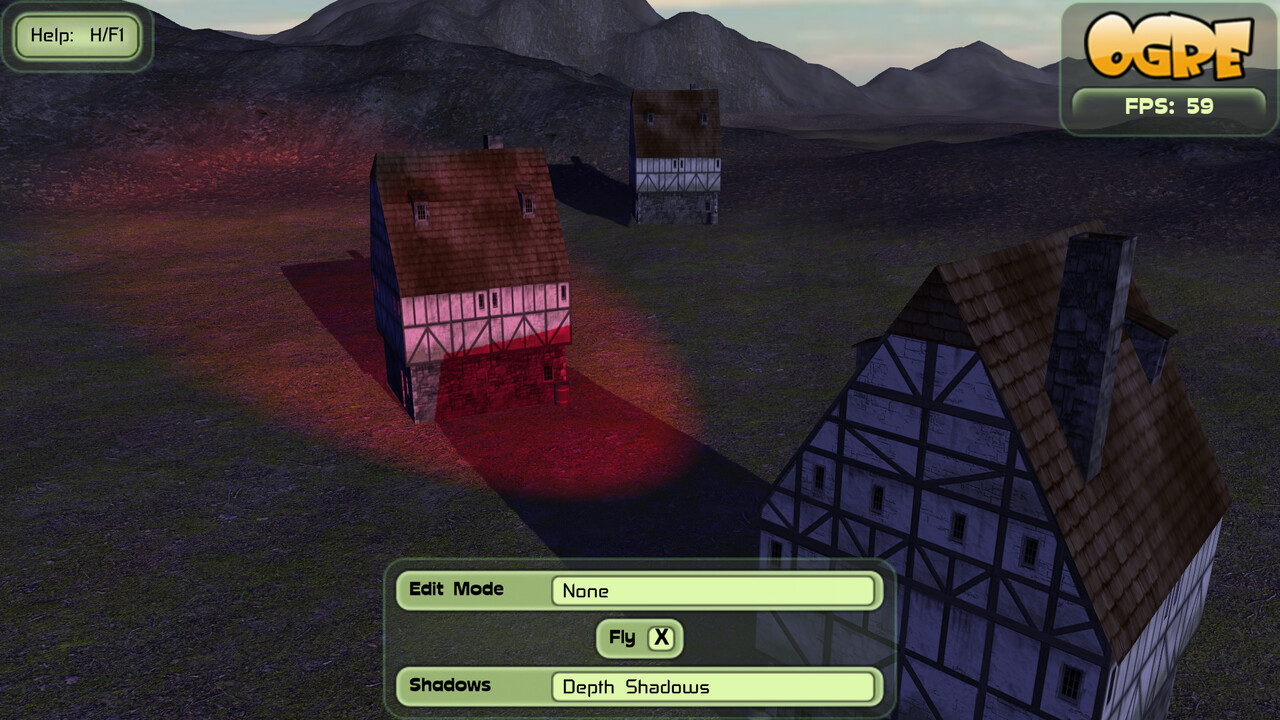
The PSSM implementation in RTSS was improved to play along with multiple light sources. While it still only supports one shadow-casting light, other non-casting light are now correctly integrated – as shown above.
While at it, the PBR lighting got some fixes too. All computations are now correctly gamma composed and the ambient lighting is no longer applied twice. Due to this your PBR materials might appear darker (as typical for a PBR workflow).
Object Space Bones
Thanks to a hint by forum user loath, Ogre now offers the option to do the bone-to-world transformation on the GPU – aka “Object Space Bones”.
Traditionally Ogre passed bones to shaders (for HW skinning) via the world_*_array auto constant. Obviously this implied the bones to be in world space. To this end, Ogre did the transformation on the CPU. While this does not add much for a few bones, it becomes noticeable if you got multiple skeletons with 40+ bones.
When using the RTSS for HW Skinning, it will automatically generate improved shaders, when the option is on.
Also, you can now use the bone_*_array alias instead of world_*_array for clarity. Note that world_*_array was exclusively used for bones by Ogre anyway.
Modernized Codebase
Finally, the codebase was overhauled to take advantage of C++11 constructs. Most notably, all functions are now annotated with override. This means that you can now enable -Wsuggest-override for code using Ogre to get the useful warnings.
Additionally, we now extensively use std::make_shared and for-each loops which slightly improve performance, but considerably improve code readability. The for-each refactoring is an ongoing effort by github user Joilnen.
Preview: RTSS Terrain
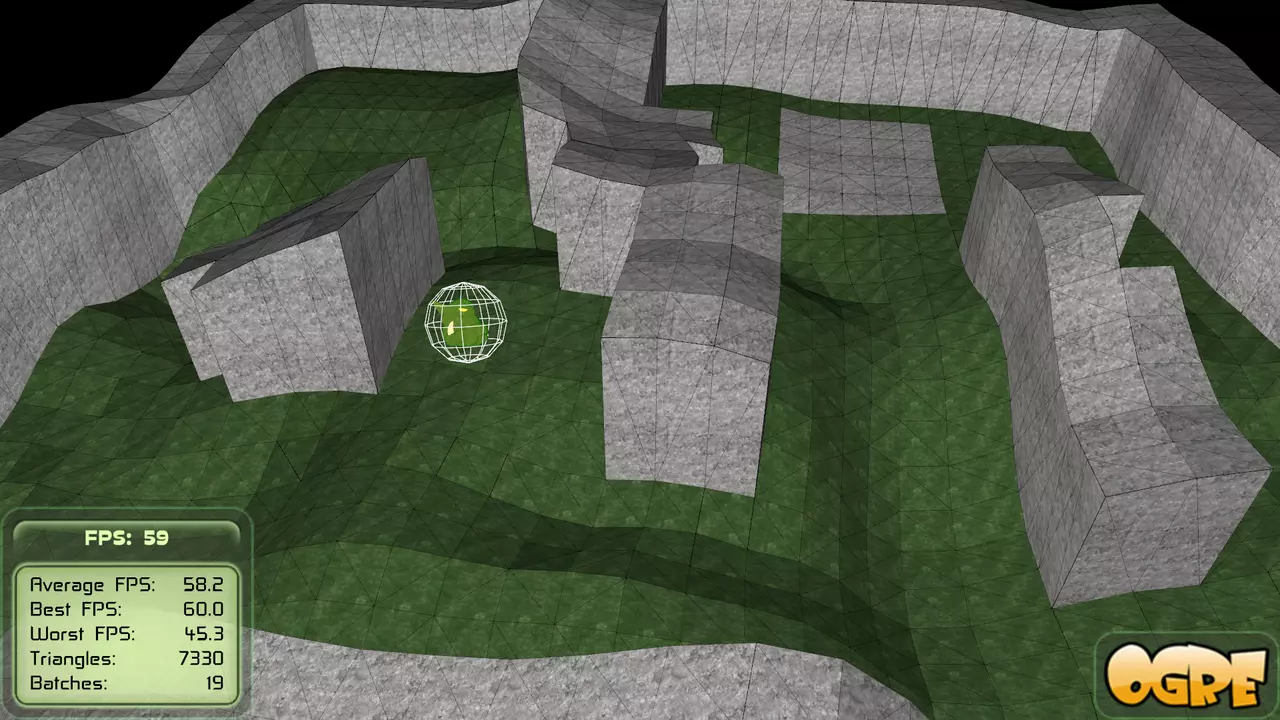
RTSS based Terrain with multiple lights
The RTSS implementation of the Terrain shaders is now fully feature complete compared to the previous custom shader generator implementation. This required some architectural changes to RTSS, but now the system is more flexible as a whole.
When it comes to the Terrain component, this means that all of the RTSS flexibility is available now:
multiple lights are now supported and benefit from the PSSM integration mentioned above
the shadows now use the hardware PCF filtering of the RTSS implementation
you can use the GBuffer SRS to do Deferred Shading with the Terrain
you can use the PBR lighting SRS if you want
This is scheduled to be merged for 13.6, as I want to get a stable 13.5 out first and this is a rather invasive change (even thought there are no API breaks).
If you want to try it out right away and give feedback before it is merged, see this branch. It contains only the terrain changes on top of the 13.5.0 release.
Ecosystem Roundup
Thanks to Simon Schmeisser there are some recent Ogre 1.12 packages in Debian (compared to the previously available v1.9). This allowed us to easily create a CI pipelines for most of the OGRECave addon projects, which will improve the stability of that code as well.
Next, our PIP package now includes the Vulkan RenderSystem. This makes ogre-python the easiest way to get started with Vulkan and Python. As far as I am aware no other python renderer exposes Vulkan yet.
Finally, my Steam Deck arrived and the first thing to do was of course this:
The additional testing on the AMD GPU in the deck resulted in some fixes for the Vulkan RenderSystem.
Ogre 13.4.0 was just released. This release contains some significant bug-fixes and feature additions, which we will discuss in more detail below. We recommend all users of the 13.x branch to update.
with blender 2.8+ and blender2ogre 0.8.3, you can now choose to export PBR metal-roughness parameters instead of converting them to a FFP approximation as before.
While at it, several bugs in the RTSS PBR implementation were fixed. Now transparency, ambient lighting and PSSM shadows play nicely with PBR.
Bullet Integration now available as a Component
In the User Survey btogre was the most popular external Ogre component with over 53% votes.
To make life for those who use it easier, it is now integrated into the main repo as a component. This allows you to just build it as part of Ogre on one hand and on the other hand this ensures that it is integration tested by our CI.
VET_INT_10_10_10_2_NORM support added
Ogre now supports normalized INT_10_10_10_2 as the vertex format. This packs 3 signed values with 10bit precision and a fourth 2bit value into 4 bytes – the size required by a single float.
If you are using normal-maps, you will notice how this format is perfect to store a tangent with parity, while only requiring 25% of storage compared to 4 floats.
Additionally, you can use it to store normals where storage requirements drop to 33% too. In both cases the 10bit resolution is typically sufficient.
The format is natively supported by GLES3, GL3+, Vulkan and Metal meaning that you also save bandwidth and VRAM.
With the other RenderSystems, Ogre will transparently unpack the data to float at mesh load time, so you at least can benefit from smaller mesh files. E.g. a 76 MB mesh can be reduced to 50 MB, when using packed normals and tangents.
To update your meshes, OgreMeshUpgrader gained the option -pack, to be used like:
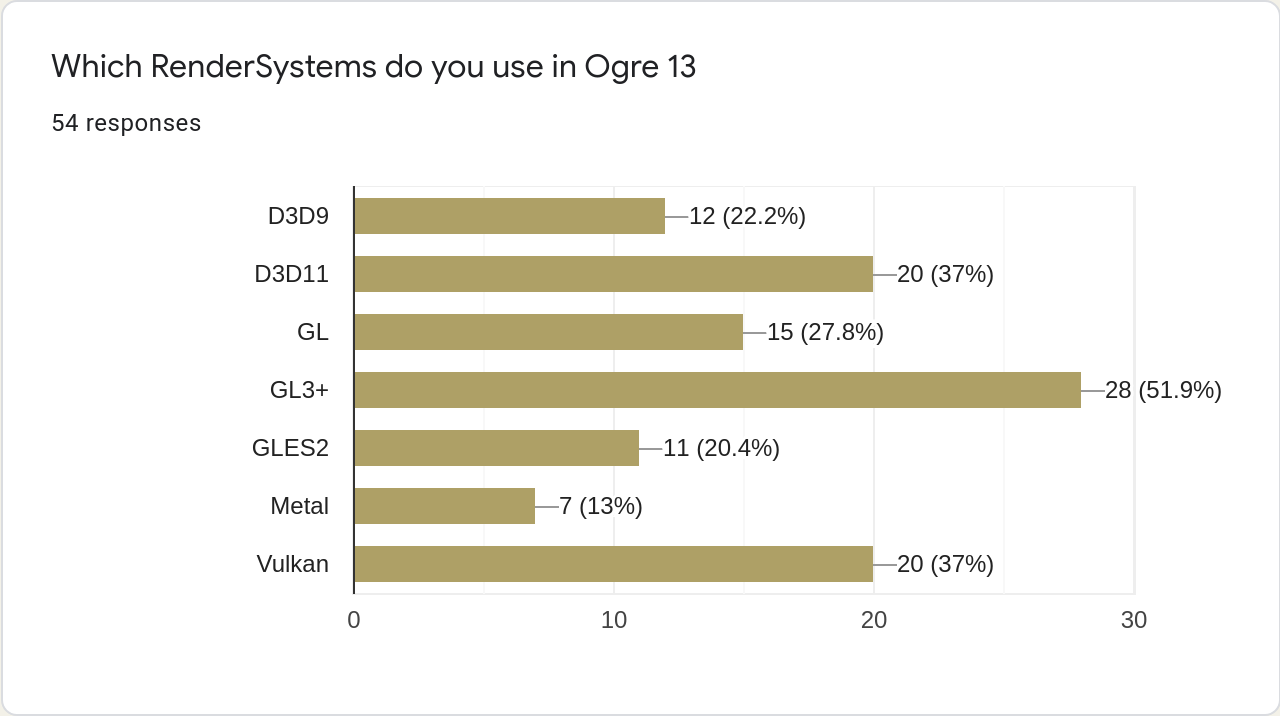
During the period of Jan 10. – February 10. we received 54 replies. At the same time the ogre 13.2.4 Windows SDK alone was downloaded 2188 times. So while the results are insightful, they are probably not representative.
When it comes to RenderSystems, we finally see a significant drop for the legacy systems (D3D9, GL). This will allow us to focus on new features only supported on modern APIs. However, I doubt the numbers for Vulkan, given how recent the Vulkan addition was.
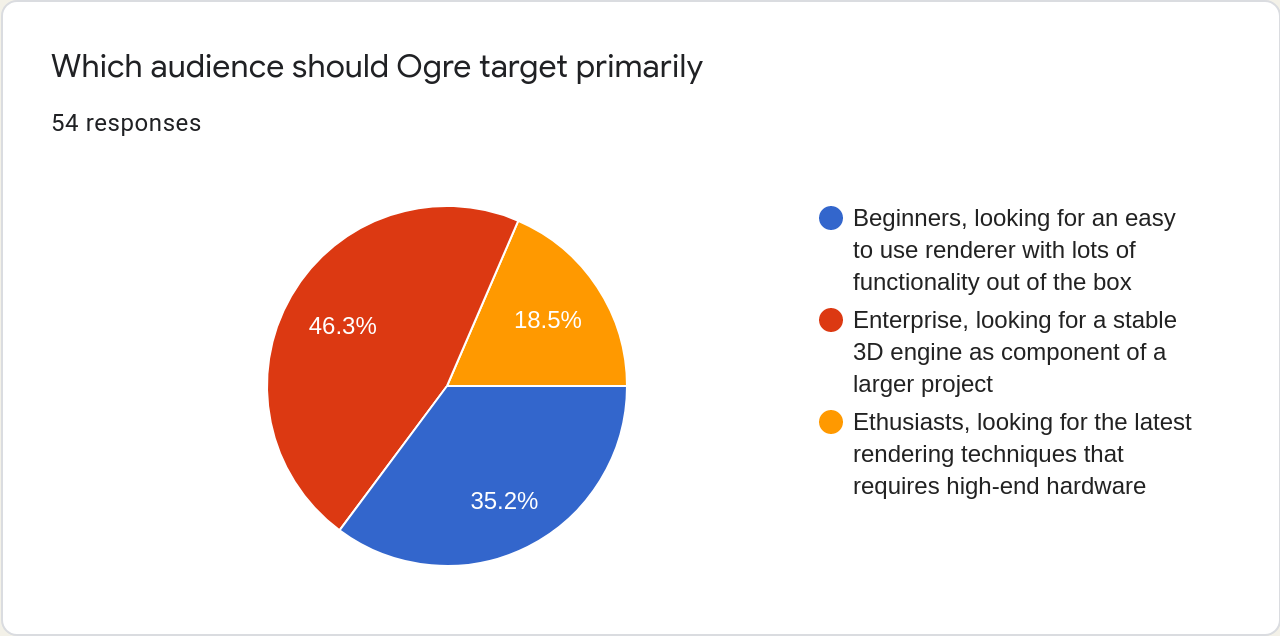
The most relevant result for further development is likely the question of target audience. Here, we see an increase of the enthusiast portion at the cost of the Enterprise one. I take it as we can sacrifice some API stability to gain modern rendering techniques when moving forward.
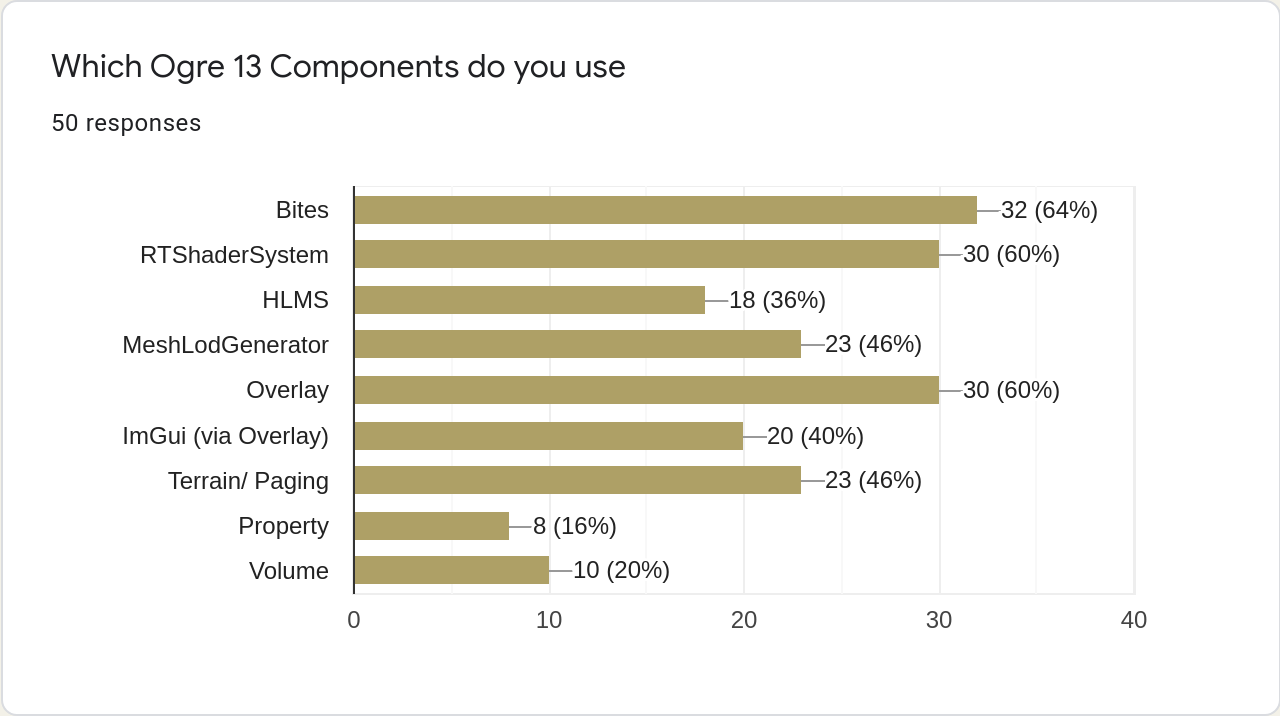
The following one is also interesting, as the HLMS was dropped with Ogre 13 and the inclusion in the poll is a copy/ paste error. I guess that any component with less than 18 votes is not actually used, but people were merely ticking every option.
The parameters are expected to be in the green and blue channels (as per glTF2.0) and lighting will be done according to the Filament equations. Alternatively, you can use material-wide settings, by omitting the texture part like:
Here, metalness is read from specular[0] and roughness from specular[1].
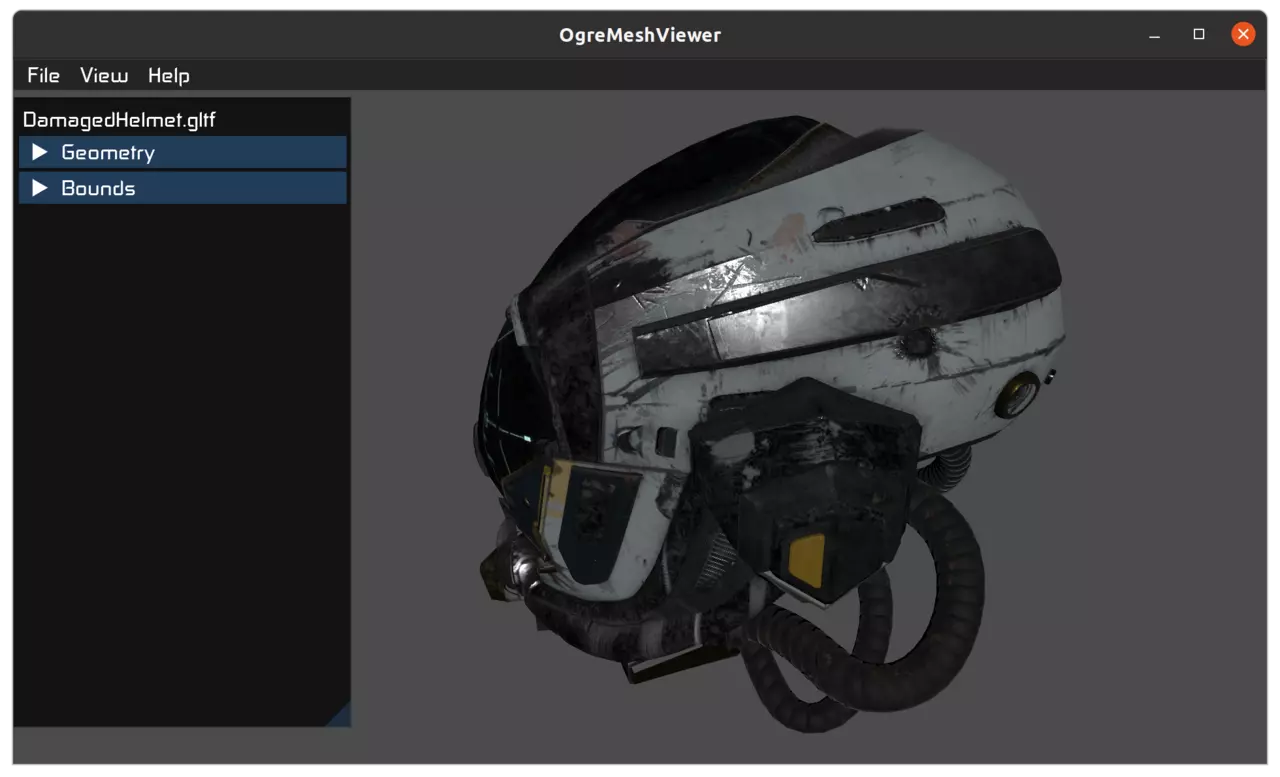
Furthermore, the Assimp Plugin will automatically use the PBR pipeline, if it encounters any PBR maps. This in turn allows correctly loading and displaying glTF2 meshes – as shown in the ogre-meshviewer screenshot above.
Improved Gamepad Support
The Gamepad Support in OgreBites (via SDL2) has been improved. Now the according events are correctly delegated to ImGui, so you can control the UI with your gamepad.
Also additional gamepad mappings can be specified by placing a gamecontroller.txt in the working directory.
Those of you who have been around Ogre for some time might remember that back in 2020, we conducted a survey about our user base. The results of which can be found here.
For the Ogre 13 development cycle we would like to assess to correctly emphasize the development on the most used features.
So for the next four weeks until the 10th of February, you have the chance to participate and help us to get an impression about our user base, how Ogre is used and share some wishes for the future. Simply follow the link and make your way through the 14 questions. It should not take up much time since most of the questions are simple checkbox or radio button questions.
We want to thank you all upfront for helping us to develop Ogre further and getting some valuable insight information about the people using the engine!
PS: We would be glad if you could spread the word about the survey via all available channels to all potential Ogre users, because: The more participants, the more accurate are the results of course.

 Ogre 13.5.0 was just released. This release contains some significant bug-fixes and feature additions, which we will discuss in more detail below. We recommend all users of the 13.x branch to update.