Ogre 14.6.0 was just released. This release contains some significant bug-fixes and feature additions, which we will discuss in more detail below. We recommend all users of the 14.x branch to update.
Ogre now supports clustered forward lighting. Instead of evaluating every light per pixel, the renderer divides the frustum into tiles and depth slices – froxels, following Filament’s approach and the technique popularised by DOOM (2016) – so each pixel only shades the lights in its own cluster. Both the clustering algorithm and its RTSS integration are merged, and since culling is decoupled from the lighting computation it works with PBR and Blinn-Phong alike. The images show a substantial speed-up in a scene with 128 lights on GL3+; gains are largest with many small point and spot lights and vary with resolution, light count and render system. The feature requires UBOs and runs on GL3+ and D3D11, with GLES3 planned.
Gizmo Widgets in OgreBites
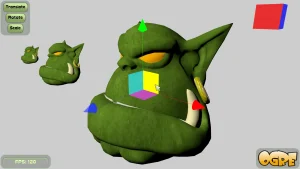
Gizmo widgets have landed in OgreBites, giving you the building blocks to build your own world editor. Included are widgets to translate, rotate and scale Nodes, plus camera orientation snapping. The architecture is intentionally simple for painless integration and rapid iteration while the feature set grows.
HDR Display support
Building on the linear colour workflow in 14.5, Ogre can now drive your monitor in High Dynamic Range mode. The new RenderSystem option “HDR Display” (window param hdrDisplay) switches the backbuffer to FP16 and requests the scRGB colour space; it requires an HDR-capable monitor with HDR enabled in the OS and currently works on Windows with GL*, D3D11 and Vulkan, with Linux planned.
Expect a darker image with a plain SDR pipeline – in HDR mode the OS anchors 1.0 to 80 nits – because the real benefit comes from values outside [0, 1]: roughly 12.5 equals 1000 nits, so Light::setPowerScale(12.5) lets the sun hit true peak brightness.
We chose scRGB for maximum compatibility, as existing SDR colours look correct immediately while the FP backbuffer still covers the full Wide Colour Gamut (P3, Rec.2020) via out-of-range and negative values, and it’s the most robust colour space for OpenGL on Windows. Tone mapping remains up to you – Ogre only clips highlights, since the ideal curve depends on your display and artistic intent (ACES, ACES1000, Khronos PBR Neutral).
Root bone motion sample
Thanks to contributions by chillywillysoft, our Skeletal Animation Sample has been greatly expanded. It now showcases proper root motion – node movement is derived directly from the animation track, so steps stay perfectly in sync with forward progress – and shows how to attach secondary animations to bone positions, with footsteps triggering a contact ripple effect on ground contact. As a bonus, Ogre’s debug drawing now visualises bounding spheres in addition to bounding boxes.
Vulkan on macOS
Ogre’s Vulkan RenderSystem now runs on macOS. Vulkan windows can be created on top of MoltenVK, giving Apple platforms a modern rendering path alongside the existing Metal and GL backends – and letting you use the same Vulkan code base across Windows, Linux and macOS.
Continuous Fuzz Testing
Ogre’s data loaders are now continuously fuzz-tested by OSS-Fuzz. Corrupted meshes no longer cause hard-to-debug stack corruption, metadata is validated before use (preventing zip and PNG header bombs), and regressions are caught before they reach a release. Even if you only ever load your own assets, this means more predictable error handling and clearer diagnostics.
As part of this hardening, the legacy mesh formats are now disabled by default. If you still rely on .mesh files older than v1.8, run them through the MeshUpgrader or re-enable the legacy path explicitly.
Since our old Gitter room was rebased on Matrix, it lost the feature that mattered most to us – being publicly viewable and indexable on the web. Zulip comes very close to Discord in terms of usability, while being fully open-source and web-public, so threads stay searchable via Google. It is also well proven in our corner of the world: Rust, LLVM all run their development discussions on Zulip.
Meet us at Tokyo Game Show
On a personal note: I will be at Tokyo Game Show 2026 at Makuhari Messe next week, all five days (17-21 September). If you are building something with Ogre – or just want to talk rendering – ping me on Zulip and we’ll arrange a meeting on site.
Ogre 14.5.0 was just released. This release contains some significant bug-fixes and feature additions, which we will discuss in more detail below. We recommend all users of the 14.x branch to update.
The “Linear Workflow” as described in GPU Gems 3 is now fully supported, finally resolving the “washed-out” look previously associated with “sRGB Gamma Conversion” Option. The RTShader System’s new setTargetLinearColours feature automatically generates shaders that convert color values to linear space before lighting calculations, ensuring physically plausible results for both PBR and classic Phong shading. Additionally, the new setUseLinearColours option in GpuProgramParams enables efficient CPU-side gamma correction for custom shaders. These updates allow you to adopt a mathematically correct lighting pipeline using your existing gamma-space materials without manual modification.
Unified Relaxed Shader Precision
Ogre is unifying shader behavior across platforms by defaulting to relaxed precision (16-bit) in fragment shaders. This update aligns desktop rendering with mobile standards (GLSL ES), unlocking performance gains on Vulkan and D3D11. By defaulting to mediump we are ensuring consistent behavior and making it easier to catch precision-related bugs on desktop hardware. This feature is enabled in the RTSS and available now on Vulkan and GLES, with D3D11 support guarded via the USE_OGRE_FROM_FUTURE macro. This paves the way for Ogre 15, where relaxed precision will become the unconditional standard.
Smarter MSAA Memory Use & Mobile Gains on OpenGL
RenderTexture MSAA across our GL RenderSystems got a significant enhancement, focusing on memory efficiency and cross-platform performance. By adopting a robust pooling strategy similar to our existing depth buffer system, we’ve optimized MSAA RenderBuffer sharing to minimize GPU memory waste while eliminating artifacts in complex “ping-pong” rendering scenarios. This release also brings MSAA support to Multi Render Targets (MRTs) in GL3Plus and GLES3 – a major win for deferred shading G-buffer passes – alongside the introduction of TEX_TYPE_2D_MULTISAMPLE to allow for custom, shader-based resolving. Finally, mobile and tile-based GPU performance sees a boost through the implementation of glInvalidateFramebuffer, which eliminates costly memory write-backs to ensure your applications run more efficiently than ever.
Ogre 14.4.0 was just released. This release contains some significant bug-fixes and feature additions, which we will discuss in more detail below. We recommend all users of the 14.x branch to update.
This release introduces major upgrades to our layered rendering capabilities. You can now efficiently render to multi-layer targets like cubemaps and texture arrays. The key feature, per-rendertarget instancing (VPRT support), enables rendering to all layers of a texture in a single pass. This dramatically reduces draw calls – by up to 6x for cubemapping and 3x for techniques like PSSM3 – addressing a core performance bottleneck in complex scenes.
These improvements are built on several foundational updates:
Add support for 2darray and cube shadow samplers in OgreMain
Targetting layered textures with the ShadowRenderer to consolidate multiple textures for a light source.
Declare texture arrays directly within Compositor scripts.
Using layered textures in the RTSS ShadowMapping SRS for more efficient binding.
Achieving this required extensive cross-component development in RTSS, RenderSystems, and core architecture. This was made possible through the sustained support of the Patreon community – i.e. this work was sponsored by you.
Initial Icon Font Support
Ogre now supports using Icon fonts by merging them into your main font. For this the “merge_font” property was added to the font scripts, which specifies the font to merge into the current one.
Text-only UIUI with font icons
Check out the screenshots above to see the difference it makes in the meshviewer!
New Bone Debug Drawing
The latest update introduces a new debug drawing, inspired by tools like Blender.
Old transform drawingNew hierarchical drawing
Instead of just seeing individual bone matrices, you’ll now see the connections between bones, making the bone hierarchy instantly clear. This also means the axis visualization is always perfectly sized – it automatically scales to the next child bone, so you’ll never struggle with tiny axes again!
Improved Bullet Component
Thanks to a valuable contribution from user slapin, the Bullet Component now supports Terrain (heightfield colliders) and features a simplified API for kinematic (user-controlled) objects.
Ecosystem: OgreWater now runs everywhere
Thanks to some crucial groundwork laid by slapin (again), I’ve successfully ported OgreWater to the OgreUnifiedShader macros.
This means, that OgreWater now runs on every RenderSystem available in Ogre, including the modern Vulkan API – instead of being restricted to D3D9 and D3D11.
It’s been 2 years since 2.3.0 and almost a year since the last 2.3.x release. It’s about time for 3.0.0!
Ogre to OgreNext name migration
We’re trying to make OgreNext and Ogre able to be installed side-by-side. The details can be found in the manual. But the short version is that we’re moving forward to have Ogre.dll and OgreNext.dll as different DLLs so that Ogre and OgreNext can coexist for projects who want to support both, and for Linux distros that want to support both without getting into name clashes.
Given that this requires changes in client projects (e.g. CMakeLists.txt and *.sln, etc) that depend on OgreNext, the old naming can be selected using the CMake variable OGRE_USE_NEW_PROJECT_NAME which defaults to OFF for 3.0, but will default to ON for 4.0; and will be scheduled for removal in OgreNext 5.0.
Dealing with ABI mismatches: AbiCookie
A common problem in our community are crashes that were caused by simple mistakes such as mixing OgreNext.dll (Release) with OgreNext.dll (Debug). Or upgrading to a newer version of OgreNext but a lingering old DLL got loaded instead.
This can cause quite cryptic errors and crashes our users were having trouble to deal with.
AbiCookie is here to fix most of this issues, as it validates on load that the DLL being loaded matches the one it is supposed to be linked against.
The ABI cookie is used like this during Ogre::Root creation:
While the AbiCookie may not catch all sort of ABI mismatches, it should catch the most common mistakes. Plugins are also always validated by the AbiCookie.
ABI Semver
Starting 3.0.0; OgreNext will follow a modifiedsemver versioning, where 3.0.x increments must absolutely not break the ABI, but 3.x.0 MIGHT be allowed to break the ABI in subtle changes. See this ticket comment for an explanation.
For this reason, most development will focus on 4.x.x; with 3.0.x for small fixes. Changes that would involve a 3.x.0 change will mostly be considered upon contract request.
Move to C++11 and general cleanup
The biggest focus of Ogre-Next 3.0.0 was easier maintenance and porting to newer versions; rather than new features.
We started aggressively using C++11’s override keyword, which makes much easier to catch derived classes whose functions have changed slightly in signature at compile-time.
We are also enforcing clang-format through CI to ensure code formatting stays consistent across the project and contributors.
Another important factor is that we fixed all warnings (or most, depending on your compiler version) in OgreNext. Now compiling OgreNext results in a clean log. This results in a more robust codebase.
Furthermore, including headers no longer generates warnings in client applications, which is unacceptable.
This is not to say all changes were coding-style and C++ version related.
Particularly there have been PBR/PBS changes to better match what other engines are doing, with compatibility functions to restore the old look.
Towards the future: Ogre-Next 4.0
Actually Ogre-Next 4.0 is far more exciting! Development started a year ago as 3.0.0 stabilized and 4.0 has already interesting features:
Multithreaded Shader Compilation and PSO generation: This greatly speeds up shader compilation, app loading and greatly reduces stutter. Available for Vulkan and Metal.
ParticleFX2 plugin: An alternate plugin for ParticleFX2 with a focus on performance (parallel CPU simulation + vertex-shader-based geometry generation). The original ParticleFX plugin will not be deprecated as it serves different means. Certain FXs are easier to perform with the original PFX, while PFX2 focus on performance for large amount of particles and special rendering features.
Alpha Hashing and Alpha Hashing with A2C (Alpha to Coverage): A very decent trick that gets impressive results to perform transparency with depth writes enabled, which means it’s Order Independent (unlike traditional alpha blending).
Ogre 14.3.0 was just released. This release contains some significant bug-fixes and feature additions, which we will discuss in more detail below. We recommend all users of the 14.x branch to update.
Ogre 14.3 now comes with an example that shows how to render 3D gaussian splats alongside with normal mesh data.
A point cloud vs the rendering as 3D gaussian splats
To efficiently store the splats they were converted from the original .ply files to native ogre .mesh files which reduced the storage by 10x. See my blog post for the details of the procedure.
To achieve this reduction the new VET_HALFx types were introduced in Ogre, which allow storing vertex attributes using 16bit floating points.
As the most useful VET_HALF3 type is neither supported by D3D9 nor by D3D11, Ogre will transparently pad it to VET_HALF4 on loading. This approach maintains reduced file sizes on these render systems with a slight increase in loading time. It’s worth mentioning that all other rendering systems, such as Metal and Vulkan, do support VET_HALF3.
Mesh Shader Support
Initial mesh shader support has been introduced in Ogre. They are supported on GL3Plus via GL_NV_mesh_shader and on Vulkan via VK_EXT_mesh_shader. Although the loading and processing of these shaders is now supported in the OgreMain component, the rest of the pipeline still needs to be developed in upcoming releases. Specifically, the generation of the meshlet structure, which is essential for the effectiveness of mesh shaders, is not yet available. Storing this structure will likely require an update to the .mesh format, which must be handled carefully to ensure backward compatibility.
Wayland Support on Linux
Thanks to the contributions of “Joakim Haugen”, “benjaminvdh” and the work of yours truly, all OpenGL and the Vulkan RenderSystems can now be compiled on Linux without any X11 dependencies and will use the Wayland display server instead. This is particularly beneficial for running Ogre on embedded devices or through WSL.
If you use OgreBites, this feature is automatically available by setting the environment variable SDL_VIDEODRIVER=wayland to instruct SDL to use Wayland. There is also initial support for OgreBitesQt, but Wayland interoperability with Qt is still under development and not fully functional with Ogre yet.
HighPy module for Python
The new HighPy module enables Ogre to function as a lightweight Python renderer. As the name implies, this module offers a high-level API, allowing users to start using Ogre without the need to read the documentation.
If you want to render a mesh it is just:
import Ogre.HighPy as ohi
ohi.window_create("ohi_world", (800, 600))
ohi.mesh_show("ohi_world", "DamagedHelmet.glb", position=(0, 0, -3))
while ohi.window_draw("ohi_world") != 27: pass
This will load the gltf2 file using the Assimp Plugin and display it using our Filament-based PBR rendering pipeline.
GLB file loaded with HighPyImGui Overlay with HighPy
want to add a GUI to that? Add
import Ogre.ImGui as ImGui
ohi.window_use_imgui("ohi_world", ImGui.ShowDemoWindow)
want to display an background image?
ohi.imshow("ohi_world", "image.png")
This will use the secure image-rs rust plugin to load most image formats.
Then there is Physics with the Bullet component and headless EGL rendering on Linux..
Another improvement to the Python bindings is that Ogre now works better with Python threading. Previously we would just hog the GIL preventing any other (python) thread to run. Now you can allow python threads while waiting for vsync by calling Ogre.Root.getSingleton().allowPyThread()

 Ogre 14.6.0 was just released. This release contains some significant bug-fixes and feature additions, which we will discuss in more detail below. We recommend all users of the 14.x branch to update.